 Skip to content
AutoCAD: Empowering Design and Engineering
AutoCAD, developed by Autodesk, stands as a cornerstone in the world of computer-aided design (CAD), revolutionizing the way architects, engineers, and designers create, visualize, and document their ideas. Let’s explore the depth and versatility of AutoCAD and its profound impact on various industries.
Introduction to AutoCAD
AutoCAD is a powerful CAD software used for 2D drafting, 3D modeling, and documentation. With its comprehensive set of tools and intuitive interface, AutoCAD enables users to create precise drawings, detailed models, and accurate documentation with ease and efficiency.
History of AutoCAD
Since its inception in 1982, AutoCAD has undergone significant evolution, continually incorporating new features and technologies to meet the evolving needs of design professionals. From its humble beginnings as a 2D drafting tool to its current status as a comprehensive design and engineering solution, AutoCAD has remained at the forefront of innovation in the CAD industry.
Key Features of AutoCAD
AutoCAD boasts a myriad of key features that set it apart from other CAD software. From drawing and drafting tools for creating precise geometries to 2D and 3D modeling capabilities for visualizing designs in three dimensions, AutoCAD provides users with the tools and flexibility to tackle any design challenge. Additionally, AutoCAD offers robust collaboration and documentation features, allowing users to seamlessly share, review, and manage design data.
How to Get AutoCAD
Accessing AutoCAD is made simple through Autodesk’s subscription-based licensing model, which offers various subscription plans tailored to individual and business needs. Additionally, Autodesk provides a free trial option, allowing users to explore AutoCAD’s features and capabilities before committing to a subscription.
Getting Started with AutoCAD
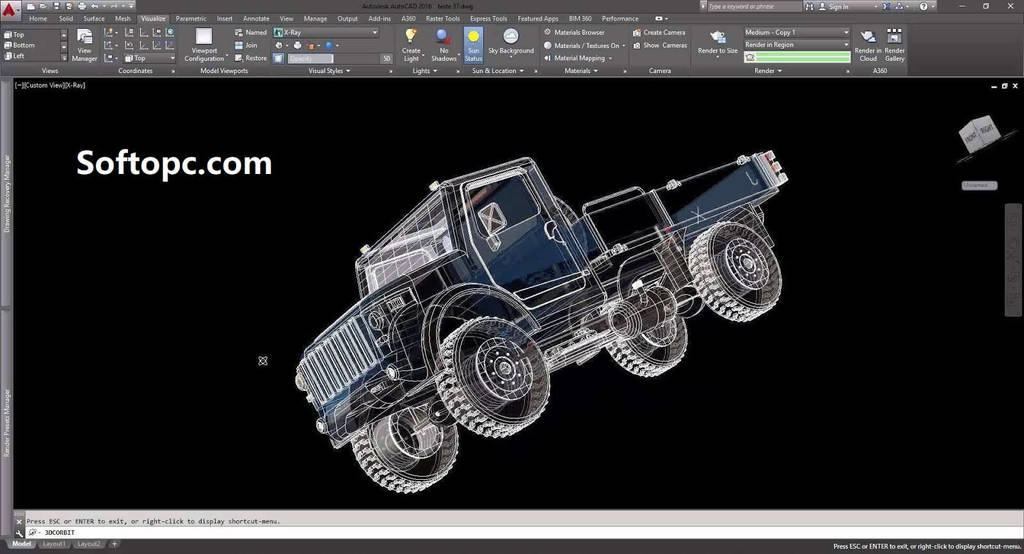
Upon launching AutoCAD, users are greeted with a clean and intuitive interface, divided into various panels and toolbars for easy navigation. New users can familiarize themselves with AutoCAD’s interface by exploring basic tools such as the Draw panel, Modify panel, and Annotation controls, enabling them to quickly get started on their design projects.
Drawing and Drafting in AutoCAD
AutoCAD offers a robust set of drawing and drafting tools for creating precise and accurate drawings. Whether it’s drawing lines, circles, or arcs, users can create geometries with ease and precision. Additionally, AutoCAD offers advanced features such as layers and linetypes for organizing and managing drawing elements, as well as dimensioning and annotation tools for adding detailed annotations to drawings.
2D and 3D Modeling in AutoCAD
In addition to 2D drafting, AutoCAD provides powerful 3D modeling capabilities for creating detailed and realistic models. Users can create 3D objects by extruding and revolving 2D profiles, as well as apply materials and textures to objects to enhance their appearance. With its intuitive modeling tools and flexible workflows, AutoCAD enables users to visualize their designs in three dimensions with unparalleled precision and detail.
Collaboration and Documentation in AutoCAD
AutoCAD facilitates seamless collaboration and documentation with its robust collaboration and documentation features. Users can easily share and collaborate on designs with colleagues and clients, as well as create and manage documentation such as drawing sheets, schedules, and bill of materials. With its cloud-based collaboration capabilities, AutoCAD enables users to work together more efficiently and effectively, regardless of their location or device.
Integrating with Other Software
AutoCAD seamlessly integrates with other Autodesk software and industry-standard formats, enabling smooth workflow interoperability. Whether it’s importing and exporting designs to and from Autodesk Revit, Autodesk Inventor, or Autodesk Fusion 360, AutoCAD offers seamless integration with a wide range of software and workflows, enabling users to collaborate and iterate more effectively.
AutoCAD Tips and Tricks
Mastering AutoCAD can be a daunting task, but with a few tips and tricks, users can streamline their workflow and enhance their productivity. Learning keyboard shortcuts, customizing workspace layouts, and automating repetitive tasks with scripts and macros can significantly improve efficiency and proficiency in AutoCAD.
AutoCAD for Various Industries
AutoCAD finds applications in a wide range of industries, including architecture, engineering, manufacturing, interior design, and construction. Its versatility and robust feature set make it indispensable for professionals seeking to create precise drawings, detailed models, and accurate documentation across various disciplines and sectors.
Future Trends of AutoCAD
As technology continues to evolve, so does AutoCAD. With the advent of artificial intelligence and cloud computing, AutoCAD is poised to embrace new frontiers in design and engineering. Integrating AI-driven features for automated design optimization and leveraging cloud-based collaboration tools are likely to shape the future of AutoCAD and redefine the way design professionals work and collaborate.
AutoCAD Community and Resources
The AutoCAD community is vast and vibrant, comprising designers, engineers, educators, and enthusiasts from around the world. Online forums, communities, and training courses offer a wealth of knowledge and resources for users looking to enhance their skills, stay updated on the latest trends and techniques, and connect with like-minded individuals.
Conclusion
In conclusion, AutoCAD stands as a cornerstone in the world of design and engineering, empowering professionals to bring their ideas to life with precision and efficiency. With its robust feature set, intuitive interface, and vibrant community of users and resources, AutoCAD continues to push the boundaries of what’s possible in the realm of CAD and design.
